There are no items in your cart
Add More
Add More
| Item Details | Price | ||
|---|---|---|---|
Easily sum up rows and columns.
Sun Nov 5, 2023
The SUM formula is a fundamental function that allows you to quickly add up values in a range of cells. It is invaluable for performing basic calculations and consolidating numerical data. Whether you need to calculate the total sales for a given period or the sum of expenses in a budget, the SUM formula simplifies the process and eliminates manual calculations.
The sum function is the most essential function in Excel. It allows you to quickly add up values in a range of cells. Whether you use the shortcut button “Ʃ”, type the formula “=SUM(range)”, or use the shortcut “Alt + Equals”, mastering the sum function is crucial for performing basic calculations and streamlining your workflow.
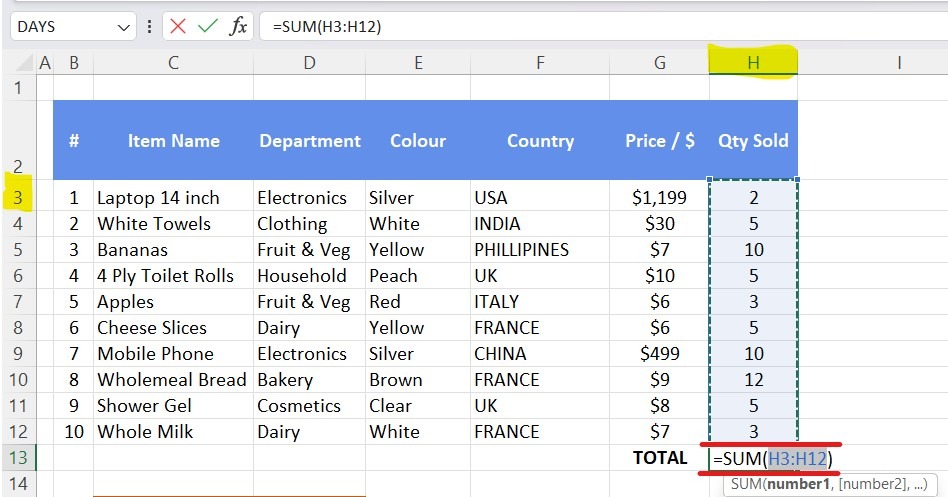
By mastering this essential SUM formula Excel function, you’ll be well-equipped to handle a wide range of data analysis tasks. To get more proficient learn the other essential Microsoft Excel formulas here: (ADD LINK TO BLOG)
LEARN SPECIFIC FORMULAS CLICK HERE:
SUMIF/SUMIFS -